扩展已经更新,新增对资源和样式的动态加载。
https://www.cnblogs.com/dalgleish/p/18972924
有了这个新增功能,我们就可以单独创建一个Styles.axaml。以后样式可以独立在这里书写,我这里写了一个RadioButton的样式。
<Styles xmlns="https://github.com/avaloniaui"xmlns:x="http://schemas.microsoft.com/winfx/2006/xaml"><Design.PreviewWith><Border Padding="20"><!-- Add Controls for Previewer Here --></Border></Design.PreviewWith><!--RadioButton自定义样式--><Style Selector="RadioButton.toggle-button"><Setter Property="Background" Value="Transparent"/><Setter Property="Padding" Value="6"/><Setter Property="Template"><ControlTemplate><Border Padding="{TemplateBinding Padding}"Background="{TemplateBinding Background}"BorderBrush="{TemplateBinding BorderBrush}"CornerRadius="6"BorderThickness="1"><ContentPresenterContent="{TemplateBinding Content}"ContentTemplate="{TemplateBinding ContentTemplate}"HorizontalAlignment="Center"VerticalAlignment="Center"/></Border></ControlTemplate></Setter><!-- 默认样式 --><Style Selector="^:normal"><Setter Property="BorderBrush" Value="Transparent"/><Setter Property="Background" Value="Transparent"/></Style><!-- 悬停样式 --><Style Selector="^:pointerover"><Setter Property="BorderBrush" Value="#BFDFFF"/><Setter Property="Background" Value="#F6FBFF"/></Style><!-- 选中样式 --><Style Selector="^:checked"><Setter Property="BorderBrush" Value="SteelBlue"/><Setter Property="Background" Value="#E8F7FF"/></Style></Style></Styles>
VisualLayer.axaml代码
<Window xmlns="https://github.com/avaloniaui"xmlns:x="http://schemas.microsoft.com/winfx/2006/xaml"xmlns:d="http://schemas.microsoft.com/expression/blend/2008"xmlns:mc="http://schemas.openxmlformats.org/markup-compatibility/2006"Height="350.4" Width="496.8" Background="AliceBlue"x:Class="AvaloniaUI.VisualLayer"Title="VisualLayer"><Grid ColumnDefinitions="auto,*"><ToolBarTray Orientation="Vertical"><ToolBar Orientation="Vertical">        <RadioButton Classes="toggle-button" Margin="0,3" Name="cmdSelectMove"><StackPanel><Image Source="avares://AvaloniaUI/Resources/Images/pointer.png" Width="35" Height="35"></Image><TextBlock>移动</TextBlock></StackPanel></RadioButton><RadioButton Classes="toggle-button" Margin="0,3" Name="cmdAdd"><StackPanel><Rectangle Width="35" Height="35" Stroke="SteelBlue" StrokeThickness="3" Fill="AliceBlue"></Rectangle><TextBlock>添加</TextBlock></StackPanel></RadioButton><RadioButton Classes="toggle-button" Margin="0,3" Name="cmdDelete"><StackPanel><Path Stroke="SteelBlue" StrokeThickness="4" StrokeLineCap="Round"Fill="Red" VerticalAlignment="Center" HorizontalAlignment="Center"><Path.Data><GeometryGroup><PathGeometry><PathFigure StartPoint="0,0"><LineSegment Point="30,30"></LineSegment></PathFigure><PathFigure StartPoint="0,30"><LineSegment Point="30,0"></LineSegment></PathFigure></PathGeometry></GeometryGroup></Path.Data></Path><TextBlock>删除</TextBlock></StackPanel></RadioButton><RadioButton Classes="toggle-button" Margin="0,3" Name="cmdSelectMultiple"><StackPanel><Image Source="avares://AvaloniaUI/Resources/Images/pointer.png" Width="35" Height="35"></Image><TextBlock>多选</TextBlock></StackPanel></RadioButton></ToolBar></ToolBarTray><Border Grid.Column="1" Margin="3" BorderBrush="SteelBlue" BorderThickness="1" Background="White"><Canvas x:Name="drawingSurface" ClipToBounds="True"></Canvas></Border></Grid>
</Window>
VisualLayer.axaml.cs代码
using Avalonia;
using Avalonia.Controls;
using Avalonia.Input;
using Avalonia.Interactivity;
using Avalonia.Media;
using Shares.Avalonia;
using System;
using System.Collections.Generic;
using System.Linq;namespace AvaloniaUI;public class RectangleVisual : Control
{public Point TopLeft { get; set; }public Size Size { get; set; }public IBrush Fill { get; set; }public Pen Pen { get; set; }private bool isSelection = false;public bool IsSelected => isSelection;public RectangleVisual(Point topLeft, Size size, IBrush fill, Pen pen, bool selection = false){TopLeft = topLeft;Size = size;Fill = fill;Pen = pen;isSelection = selection;}public void SetSelected(bool selected){isSelection = selected;InvalidateVisual();}public new Rect Bounds => new Rect(TopLeft, Size);public override void Render(DrawingContext context){var brush = isSelection ? Brushes.LightGoldenrodYellow : Fill;context.DrawRectangle(brush, Pen, this.Bounds);}
}public partial class VisualLayer : Window
{private List<RectangleVisual> visuals = new List<RectangleVisual>();private IBrush drawingBrush = Brushes.AliceBlue;private Pen drawingPen = new Pen(Brushes.SteelBlue, 1);private Size squareSize = new Size(35, 35);private bool isDragging = false;private Point dragStartPoint;private bool isMultiSelecting = false;private Point selectionSquareTopLeft;private RectangleVisual? selectionSquare;private Pen selectionSquarePen = new Pen(Brushes.Black, 1, dashStyle: new DashStyle(new double[] { 4, 2 }, 0));private IBrush selectionSquareBrush = Brushes.Transparent;private void AddVisual(RectangleVisual visual){visuals.Add(visual);drawingSurface.Children.Add(visual);}private void DeleteVisual(RectangleVisual visual){visuals.Remove(visual);drawingSurface.Children.Remove(visual);}private RectangleVisual? GetVisualAt(Point point){foreach (var v in visuals){if (v.Bounds.Contains(point)) return v;}return null;}private void SelectVisual(RectangleVisual? visual){foreach (var v in visuals)v.SetSelected(v == visual);}private void ClearSelection(){foreach (var v in visuals)v.SetSelected(false);}public VisualLayer(){InitializeComponent();this.Load("avares://Shares/Avalonia/Styles/Styles.axaml");drawingSurface.Background = Brushes.Transparent;drawingSurface.PointerPressed += DrawingSurface_PointerPressed;drawingSurface.PointerMoved += DrawingSurface_PointerMoved;drawingSurface.PointerReleased += DrawingSurface_PointerReleased;// 模式切换时清空选中cmdAdd.IsCheckedChanged += ModeRadioButton_IsCheckedChanged;cmdDelete.IsCheckedChanged += ModeRadioButton_IsCheckedChanged;cmdSelectMultiple.IsCheckedChanged+= ModeRadioButton_IsCheckedChanged;// 测试矩形var rect = new RectangleVisual(new Point(10, 10), squareSize, drawingBrush, drawingPen);AddVisual(rect);}private void ModeRadioButton_IsCheckedChanged(object? sender, RoutedEventArgs e){if (sender is RadioButton rb && rb.IsChecked == true){ClearSelection();}}private void DrawingSurface_PointerPressed(object? sender, PointerPressedEventArgs e){Point pointClicked = e.GetPosition(drawingSurface);if (cmdSelectMove?.IsChecked == true){var visual = GetVisualAt(pointClicked);if (visual != null){if (!visual.IsSelected)SelectVisual(visual);isDragging = true;dragStartPoint = pointClicked;e.Pointer.Capture(drawingSurface);}elseClearSelection();}else if (cmdAdd?.IsChecked == true){var visual = new RectangleVisual(pointClicked, squareSize, drawingBrush, drawingPen);AddVisual(visual);}else if (cmdDelete?.IsChecked == true){var visual = GetVisualAt(pointClicked);if (visual != null)DeleteVisual(visual);}else if (cmdSelectMultiple?.IsChecked == true){selectionSquareTopLeft = pointClicked;isMultiSelecting = true;selectionSquare = new RectangleVisual(selectionSquareTopLeft, new Size(0, 0),selectionSquareBrush, selectionSquarePen, true);selectionSquare.SetSelected(false);AddVisual(selectionSquare);e.Pointer.Capture(drawingSurface);}}private void DrawingSurface_PointerMoved(object? sender, PointerEventArgs e){Point pos = e.GetPosition(drawingSurface);if (isDragging){var delta = pos - dragStartPoint;foreach (var v in visuals.Where(v => v.IsSelected)){v.TopLeft += delta;v.InvalidateVisual();}dragStartPoint = pos;}else if (isMultiSelecting && selectionSquare != null){selectionSquare.Size = new Size(Math.Abs(pos.X - selectionSquareTopLeft.X),Math.Abs(pos.Y - selectionSquareTopLeft.Y));selectionSquare.TopLeft = new Point(Math.Min(pos.X, selectionSquareTopLeft.X),Math.Min(pos.Y, selectionSquareTopLeft.Y));selectionSquare.InvalidateVisual();}}private void DrawingSurface_PointerReleased(object? sender, PointerReleasedEventArgs e){if (isDragging){isDragging = false;e.Pointer.Capture(null);}else if (isMultiSelecting && selectionSquare != null){foreach (var v in visuals){if (selectionSquare.Bounds.Intersects(v.Bounds))v.SetSelected(true);elsev.SetSelected(false);}DeleteVisual(selectionSquare);selectionSquare = null;isMultiSelecting = false;e.Pointer.Capture(null);}}
}
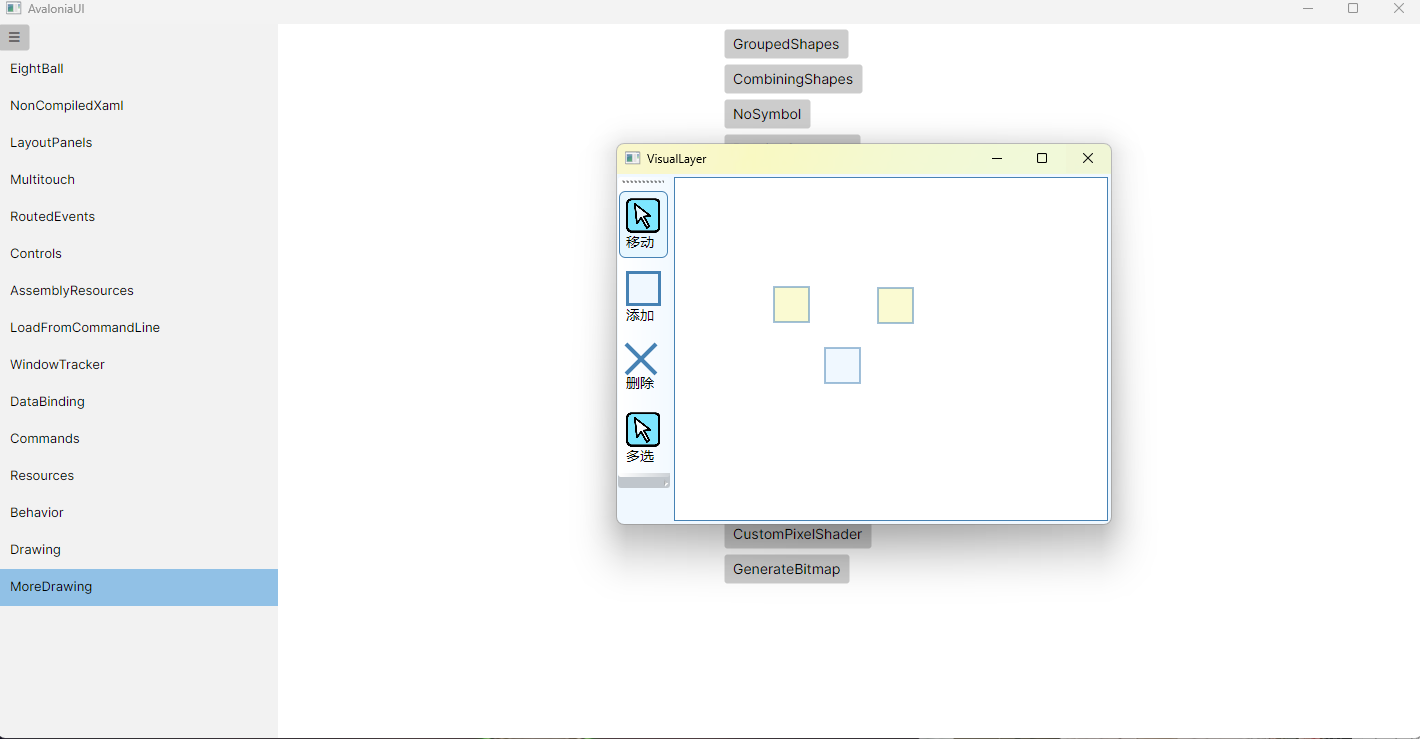
运行效果