
1.引入pom文件
<!-- Apache POI for Word document generation --><dependency><groupId>org.apache.poi</groupId><artifactId>poi</artifactId><version>5.2.3</version></dependency><dependency><groupId>org.apache.poi</groupId><artifactId>poi-ooxml</artifactId><version>5.2.3</version></dependency><dependency><groupId>org.apache.poi</groupId><artifactId>poi-scratchpad</artifactId><version>5.2.3</version></dependency><!-- Apache POI PDF Converter --><dependency><groupId>fr.opensagres.xdocreport</groupId><artifactId>fr.opensagres.xdocreport.converter.docx.xwpf</artifactId><version>2.0.6</version></dependency>
2.Word模板使用说明
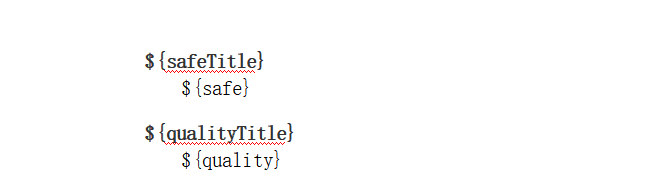
在`src/main/resources/templates/`(自定义)目录下放置Word模板文件,例如`rectification_template.docx`。在模板中使用占位符格式:`${字段名}`,例如:
- `${safe}`
- `${quality}` 当调用接口时,系统会根据模板和数据生成新的Word文档
3.代码
@ApiOperation("预览整改通知PDF文档")@GetMapping("/previewPdfDocument/{id}")public void previewPdfDocument(@PathVariable Long id, HttpServletResponse response) {try {// 生成PDF文档文件File pdfFile = rectificationService.generatePdfDocumentFile(id);if (pdfFile == null) {response.sendError(HttpServletResponse.SC_INTERNAL_SERVER_ERROR, "PDF文档生成失败");return;}// 设置响应头,使浏览器直接预览而不是下载response.setContentType("application/pdf");response.setContentLength((int) pdfFile.length());// 写入响应try (FileInputStream fileInputStream = new FileInputStream(pdfFile);ServletOutputStream outputStream = response.getOutputStream()) {byte[] buffer = new byte[1024];int bytesRead;while ((bytesRead = fileInputStream.read(buffer)) != -1) {outputStream.write(buffer, 0, bytesRead);}outputStream.flush();}// 删除临时文件pdfFile.delete();} catch (Exception e) {try {response.sendError(HttpServletResponse.SC_INTERNAL_SERVER_ERROR, "PDF文档生成或预览过程中发生错误: " + e.getMessage());} catch (IOException ioException) {ioException.printStackTrace();}}}
4.代码2
@Overridepublic File generatePdfDocumentFile(Long id) {try {// 首先生成Word文档ByteArrayOutputStream wordOutputStream = generatePdf(id);if (wordOutputStream == null) {return null;}// 创建临时文件File pdfFile = File.createTempFile("rectification_" + id + "_", ".pdf");// 将Word转换为PDF并写入文件try (ByteArrayInputStream wordInputStream = new ByteArrayInputStream(wordOutputStream.toByteArray());FileOutputStream pdfOutputStream = new FileOutputStream(pdfFile)) {PdfUtil.convertWordToPdfFormatted(wordInputStream, pdfOutputStream);return pdfFile;}} catch (Exception e) {e.printStackTrace();return null;}}
5.模板数据填入
@Overridepublic ByteArrayOutputStream generatePdf(Long id) {Intion entity = baseMapper.selectById(id);//改成自己需要的数据if (null == entity) {return null;}//模板路径ClassPathResource resource = new ClassPathResource("templates/rectification_template.docx");// 准备模板数据Map<String, Object> dataMap = new HashMap<>();dataMap.put("safe", entity.getSafe());try {// 获取模板路径String templatePath = resource.getFile().getAbsolutePath();// 生成Word文档ByteArrayOutputStream outputStream = new ByteArrayOutputStream();WordTemplateUtil.generateWordFromTemplate(templatePath, dataMap, outputStream);return outputStream;} catch (Exception e) {e.printStackTrace();return null;}}
6.word工具类
import org.apache.poi.xwpf.usermodel.*;
import java.io.*;
import java.util.Map;
import java.util.List;/*** Word模板工具类* 根据Word模板生成带数据的Word文档*/
public class WordTemplateUtil {/*** 根据模板生成Word文档* @param templatePath 模板文件路径* @param params 数据参数* @param outputStream 输出流* @throws IOException IO异常*/public static void generateWordFromTemplate(String templatePath, Map<String, Object> params, OutputStream outputStream) throws IOException {try (FileInputStream fis = new FileInputStream(templatePath);XWPFDocument document = new XWPFDocument(fis)) {// 替换段落中的占位符
            replaceInParagraphs(document, params);// 替换表格中的占位符
            replaceInTables(document, params);// 写入输出流
            document.write(outputStream);}}/*** 替换段落中的占位符* @param document Word文档* @param params 参数映射*/private static void replaceInParagraphs(XWPFDocument document, Map<String, Object> params) {for (XWPFParagraph paragraph : document.getParagraphs()) {for (XWPFRun run : paragraph.getRuns()) {String text = run.getText(0);if (text != null) {for (Map.Entry<String, Object> entry : params.entrySet()) {String placeholder = "${" + entry.getKey() + "}";Object value = entry.getValue();if (text.contains(placeholder)) {text = text.replace(placeholder, value != null ? value.toString() : "");run.setText(text, 0);}}}}}}/*** 替换表格中的占位符* @param document Word文档* @param params 参数映射*/private static void replaceInTables(XWPFDocument document, Map<String, Object> params) {for (XWPFTable table : document.getTables()) {for (XWPFTableRow row : table.getRows()) {for (XWPFTableCell cell : row.getTableCells()) {for (XWPFParagraph paragraph : cell.getParagraphs()) {for (XWPFRun run : paragraph.getRuns()) {String text = run.getText(0);if (text != null) {for (Map.Entry<String, Object> entry : params.entrySet()) {String placeholder = "${" + entry.getKey() + "}";Object value = entry.getValue();if (text.contains(placeholder)) {text = text.replace(placeholder, value != null ? value.toString() : "");run.setText(text, 0);}}}}}}}}}/*** 生成表格数据* @param document Word文档* @param bookmark 表格书签* @param headers 表头* @param dataList 数据列表*/public static void generateTableData(XWPFDocument document, String bookmark, String[] headers, List<Object[]> dataList) {// 查找书签位置// 这里简化处理,实际应用中可以通过查找书签位置来确定表格插入点// 创建表格XWPFTable table = document.createTable();// 设置表头XWPFTableRow headerRow = table.getRow(0);for (int i = 0; i < headers.length; i++) {if (i == 0) {headerRow.getCell(0).setText(headers[i]);} else {headerRow.addNewTableCell().setText(headers[i]);}}// 填充数据for (Object[] rowData : dataList) {XWPFTableRow row = table.createRow();for (int i = 0; i < rowData.length; i++) {row.getCell(i).setText(rowData[i] != null ? rowData[i].toString() : "");}}}
}
7.pdf 工具类
import org.apache.poi.xwpf.usermodel.XWPFDocument;
import fr.opensagres.poi.xwpf.converter.pdf.PdfConverter;
import fr.opensagres.poi.xwpf.converter.pdf.PdfOptions;import java.io.InputStream;
import java.io.OutputStream;
import java.io.IOException;/*** PDF工具类* 提供Word转PDF等功能*/
public class PdfUtil {/*** 将Word文档转换为PDF (使用Apache POI实现)* 使用org.apache.poi.xwpf.usermodel.XWPFDocument和fr.opensagres.poi.xwpf.converter.pdf实现转换* @param wordInputStream Word文档输入流* @param pdfOutputStream PDF文档输出流* @throws Exception 转换异常*/public static void convertWordToPdfFormatted(InputStream wordInputStream, OutputStream pdfOutputStream) throws Exception {try {// 使用Apache POI加载Word文档XWPFDocument document = new XWPFDocument(wordInputStream);// 创建PDF转换选项PdfOptions options = PdfOptions.create();// 执行转换
            PdfConverter.getInstance().convert(document, pdfOutputStream, options);} catch (IOException e) {throw new Exception("转换Word为PDF失败", e);}}
}