
1.reboot重启设备命令
reboot命令用来重新启动设备。
该命令功能与设备关闭电源再开启电源的效果相同。在对设备进行远程维护时,不需到现场重新启动设备,只需执行本命令即可在远程重新启动设备。
【1】重新启动设备
执行命令reboot后,如果修改了设备当前配置,系统重启前将提示用户是否保存配置。
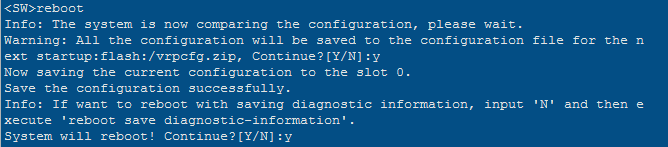
Info: The system is now comparing the configuration, please wait.
Warning: The configuration has been modified, and it will be saved to the next startup saved-configuration file . Continue? [Y/N]:N //选择N,不保存配置
Info: If want to reboot with saving diagnostic information, input ‘N’ and then execute ‘reboot save diagnostic-information’.
System will reboot! Continue?[Y/N]:y //提示是否重启,选择Y重启
【2】快速重新启动设备
执行命令reboot fast后,系统将快速重启设备,不提示用户是否保存配置,未保存的配置信息将丢失。

Info: If want to reboot with saving diagnostic information, input 'N' and then e
xecute 'reboot save diagnostic-information'.
System will reboot! Continue?[Y/N]:y //提示是否重启,选择Y重启
执行命令reboot fast后,系统会提示如下信息: Info: system is sync data now, please wait ... 当出现该提示信息时,表示设备内部正在进行数据同步操作。
注意事项
执行该命令后,如果用户不对系统提示信息做响应,则超时后会退回到用户视图,不重新启动。
在一般情况下,请勿使用该命令,否则将导致整个设备业务中断。
在重启设备前,要确认配置文件是否已经保存。
2.save保存配置命令
清空重启后,再配置交换机,或者新开局第一次配置交换机,在保存配置时,一定要根据回显提示,输入两次y,才能保存成功。回显如下:
<Quidway> save The current configuration will be written to the device. Are you sure to continue?[Y/N]y
Info: Please input the file name ( *.cfg, *.zip ) [vrpcfg.zip]: flash:/vrpcfg.zip exists, overwrite?[Y/N]:y
Now saving the current configuration to the slot 0. Save the configuration successfully.
3.清空配置恢复出厂配置命令
如果需要清楚全部配置恢复出厂配置,请按照下面命令行操作。
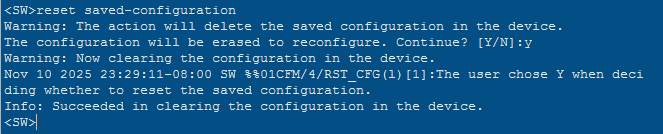
<SW>reset saved-configuration ////清除当前配置
Warning: The action will delete the saved configuration in the device.
The configuration will be erased to reconfigure. Continue? [Y/N]:y
Warning: Now clearing the configuration in the device.
Nov 10 2025 23:29:11-08:00 SW %%01CFM/4/RST_CFG(l)[1]:The user chose Y when deci
ding whether to reset the saved configuration.
Info: Succeeded in clearing the configuration in the device.
<SW>