
一、概述
uni-app x 提供了 uni.request() 方法。
uni.request({url: 'https://api.example.com',method: 'GET'
})
在实际项目开发中,直接使用 uni.request 会带来诸多问题,例如:
- 重复代码多(如每次都要写 baseURL)
- 错误处理分散,难以统一管理
- 缺乏请求/响应拦截能力
- Token 注入繁琐
- Loading 状态管理混乱
为了解决这些问题,封装一个统一的 HTTP 请求库是企业级开发的最佳实践。
二、封装request
uview-plus 自带一个 http 模块,但是在实际项目中,还是要自己封装一个,统一管理。
在项目根目录创建utils目录,在里面创建request.ts。 注意:文件后缀必须是ts,而不是js
// utils/request.ts
import { http } from 'uview-plus'/* 1. 全局配置 */
http.setConfig((config) => {config.baseURL = 'https://api.example.com'  // api地址config.timeout = 8000  // 单位毫秒,对应8秒config.loadingText = '加载中...'config.loading = true          // 开启 loading 动画
    return config
})/* 2. 请求拦截 */
http.interceptors.request.use((config) => {const token = uni.getStorageSync('token')if (token) config.header.Authorization = `Bearer ${token}`return config
})/* 3. 响应拦截 */
http.interceptors.response.use((response) => response.data,(err) => {// 🔥 强制断言,让 UTS 闭嘴(uni as any).$u.toast(err.message || '网络错误')return Promise.reject(err)}
)export default http
修改 main.uts,引入 request,并挂载为全局属性$http
import App from './App.uvue'import { createSSRApp } from 'vue'import uviewPlus from 'uview-plus'/* 1. 引入 request(里面已经初始化好 http) */
import http from '@/utils/request'export function createApp() {const app = createSSRApp(App)/* 2. 挂到全局属性 */app.config.globalProperties.$http = httpapp.use(uviewPlus)return {app}
}
三、使用request
由于在main.uts挂载了全局属性,因此在pages里面的uvue文件,就可以直接调用了。比如:
get请求
const res = await this.$http.get('/test', {})
post请求
const res = await this.$http.post('/login', {username: 'admin',password: 123456
})
post请求,增加成功和失败处理
async login() {try {/* === 成功分支 === */const res = await this.$http.post('/login', {username: 'admin',password: '123456'})// 这里只写“成功后的业务”uni.setStorageSync('token', res.token)this.$u.toast('登录成功')uni.switchTab({ url: '/pages/index/index' })} catch (err: any) {/* === 失败分支 === */// 拦截器已弹通用提示,这里可做“额外”处理console.error('登录失败', err)if (err.statusCode === 401) {this.$u.toast('账号或密码错误')}}
}
post请求,局部请求不想显示 loading
await this.$http.post('/log', data, { loading: false })
uview-plus 的 http 模块已经内置了 “请求开始自动显示 loading,响应结束自动隐藏” 的机制,
你只需要 把 loading 开关打开 即可,成功/失败/超时都会 统一自动关闭,无需手动处理。
效果:
调用 this.$http.get/post 瞬间 → 出现 uview-plus 的 loading 遮罩
请求 成功/失败/超时 → 遮罩 自动消失(由 uview 内部 finally 关闭)
无需自己 uni.showLoading() / uni.hideLoading()
post请求,增加header
await this.$http.post('/upload', body, {header: {'Content-Type': 'application/x-wwwz-form-urlencoded','X-Custom': 'abc123'}
})
put请求
const res = await this.$http.put('/test', {id:1})
delete请求
const res = await this.$http.delete('/test', {id:1})
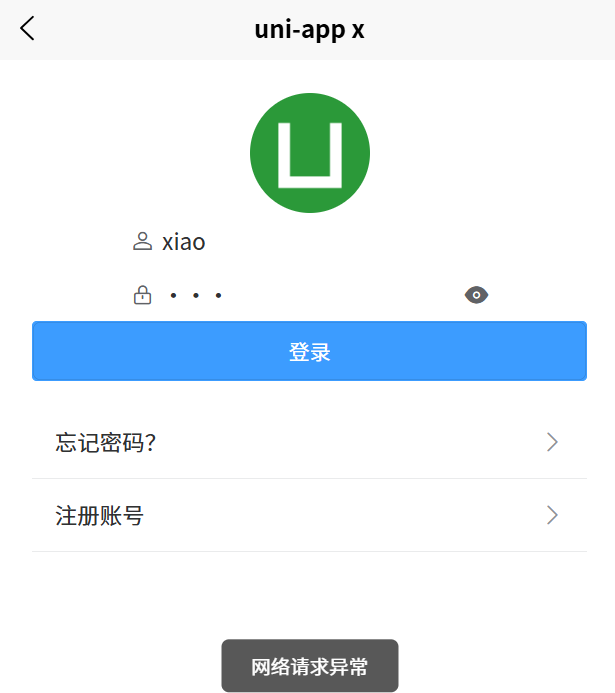
四、登录页面
login.uvue
<template><view class=""><!-- 导航栏 --><u-navbar title="用户登录" /><!-- 内容区 --><view class="content"><!-- 头像 --><u-avatar :src="logo" size="80"></u-avatar><!-- 表单 --><u--form :model="form" labelPosition="left"><u--input v-model="form.username" placeholder="请输入用户名" prefixIcon="account" /><u--input v-model="form.password" placeholder="请输入密码" type="password" prefixIcon="lock" /></u--form><!-- 按钮 --><u-button text="登录" type="primary" @click="login" /><!-- 链接 --><view class="links"><u-cell title="忘记密码?" isLink @click="gotoForget" /><u-cell title="注册账号" isLink @click="gotoRegister" /></view></view></view>
</template><script>export default {data() {return {title: 'Hello',logo: '/static/logo.png',form: {username: '',password: '',}}},onLoad() {},methods: {async login() {if (!this.form.username) {uni.showToast({ title: '请输入用户名', icon: 'none' })return}// 请求登录接口
                try {/* === 成功分支 === */const res = await this.$http.post('/login', {username: this.form.username,password: this.form.password})// 这里只写“成功后的业务”uni.setStorageSync('token', res.token)this.$u.toast('登录成功')uni.switchTab({ url: '/pages/index/index' })} catch (err : any) {/* === 失败分支 === */// 拦截器已弹通用提示,这里可做“额外”处理console.error('登录失败', err)if (err.statusCode === 401) {this.$u.toast('账号或密码错误')}this.$u.toast('网络请求异常')}},gotoForget() {uni.navigateTo({ url: '/pages/forget/index' })},gotoRegister() {uni.navigateTo({ url: '/pages/register/index' })}}}
</script><style scoped>.content {padding: 40rpx;display: flex;flex-direction: column;align-items: center;}.links {margin-top: 30rpx;width: 100%;}
</style>
效果如下:
针对大型项目,可以在utils里面新建一个api.ts,用来编写一些公用业务函数,例如:
import http from './request.js'/* 登录 */
export const login = (username, pwd) =>http.post('/login', { username, pwd })/* 轮播图 */
export const getBanner = () =>http.get('/banner')/* 商品列表 */
export const getGoods = (params) =>http.get('/goods', { params })
然后在pages里面的页面,就可以调用了,无需重复写函数。
<script>import { getBanner } from '@/utils/api.ts'export default {data() {return {title: 'Hello',bannerList: [],}},onLoad() {this.getbannerList()},methods: {async getbannerList() {/* 直接调用 */this.bannerList = await getBanner()},}}
</script>
注意:直接调用,要用异步,函数名前面加async