
详细介绍:vue+cesium示例:3Dtiles三维模型高度调整(附源码下载)
接到一位知识星友的邀请,实现他需要3Dtiles三维模型的简单高度调整需求,适合学习Cesium与前端框架结合开发3D可视化项目。
demo源码运行环境以及配置
运行环境:依赖Node安装环境,demo本地Node版本:推荐v18+。
运行工具:vscode或者其他器具。
配置方式:下载demo源码,vscode打开,然后顺序执行以下命令: (1)下载demo环境依赖包命令:npm install
(2)启动demo命令:npm run dev (3)打包demo命令: npm run build
技术栈
Vue 3.5.13
Vite 6.2.0
Cesium1.128.0
示例效果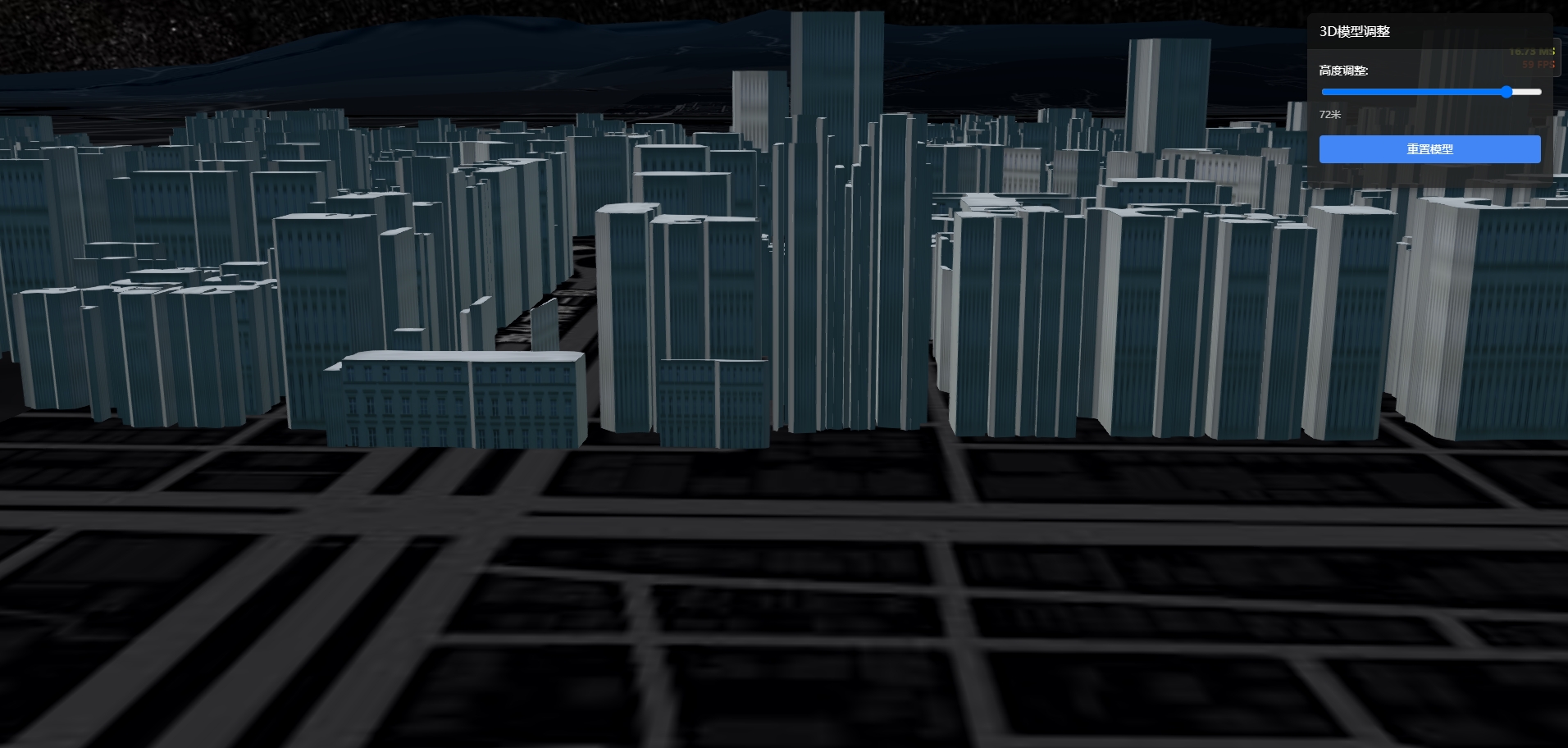
核心源码
<template><div id="cesiumContainer"class="cesium-container"><!-- 模型调整控制面板 --><div class="control-panel"><div class="panel-header"><h3>3D模型调整</h3></div><div class="panel-body"><!-- 高度调整 --><div class="control-group"><label>高度调整:</label><input type="range" min="-100" max="100" step="1" v-model="heightOffset" @input="updateHeight" /><span>{{heightOffset}}米</span></div><!-- 重置按钮 --><div class="control-group"><button @click="resetModel">重置模型</button></div></div></div></div></template><script setup>import {onMounted, onUnmounted, ref}from 'vue';import *as Cesium from 'cesium';// 定义模型调整参数const heightOffset = ref(0);// 保存原始模型矩阵let originalModelMatrix =null;// Cesium.Ion.defaultAccessToken = 'eyJhbGciOiJIUzI1NiIsInR5cCI6IkpXVCJ9.eyJqdGkiOiI3ZjQ5ZGUzNC1jNWYwLTQ1ZTMtYmNjYS05YTY4ZTVmN2I2MDkiLCJpZCI6MTE3MTM4LCJpYXQiOjE2NzY0NDUyODB9.ZaNSBIfc1sGLhQd_xqhiSsc0yr8oS0wt1hAo9gbke6M';// 设置cesium静态资源路径// window.CESIUM_BASE_URL = "/";// 声明Cesium Viewer实例let viewer, tileset =null;let handler =null;// 组件挂载后初始化CesiumonMounted(async () =>{// 初始化Cesium Viewerviewer =new Cesium.Viewer('cesiumContainer', {// 基础配置animation: false, // 动画小部件baseLayerPicker: false, // 底图选择器fullscreenButton: false, // 全屏按钮vrButton: false, // VR按钮geocoder: false, // 地理编码搜索框homeButton: false, // 主页按钮infoBox: false, // 信息框 - 禁用点击弹窗sceneModePicker: false, // 场景模式选择器selectionIndicator: false, // 选择指示器timeline: false, // 时间轴navigationHelpButton: false, // 导航帮助按钮navigationInstructionsInitiallyVisible: false, // 导航说明初始可见性scene3DOnly: false, // 仅3D场景});// 隐藏logoviewer.cesiumWidget.creditContainer.style.display = "none";viewer.scene.globe.enableLighting = true;// 取消天空盒显示// viewer.scene.skyBox.show = false;// 禁用大气层和太阳viewer.scene.skyAtmosphere.show = false;// viewer.scene.sun.show = false;// viewer.scene.moon.show = false;// 设置背景为黑色// viewer.scene.backgroundColor = Cesium.Color.BLACK;//前提先把场景上的图层全部移除或者隐藏 // viewer.scene.globe.baseColor = Cesium.Color.BLACK; //修改地图蓝色背景viewer.scene.globe.baseColor =new Cesium.Color(0.0, 0.1, 0.2, 1.0);//修改地图为暗蓝色背景// 设置抗锯齿viewer.scene.postProcessStages.fxaa.enabled = true;// 清除默认底图viewer.imageryLayers.remove(viewer.imageryLayers.get(0));// 加载底图 - 使用更暗的地图服务// const imageryProvider = await Cesium.ArcGisMapServerImageryProvider.fromUrl("https://services.arcgisonline.com/ArcGIS/rest/services/World_Imagery/MapServer");const imageryProvider =await Cesium.ArcGisMapServerImageryProvider.fromUrl("https://services.arcgisonline.com/ArcGIS/rest/services/Canvas/World_Dark_Gray_Base/MapServer");const layer = viewer.imageryLayers.addImageryProvider(imageryProvider);// 调整图层亮度和对比度,使其更暗layer.brightness = 0.8;// 降低亮度layer.contrast = 1.8;// 调整对比度// 设置默认视图位置 - 默认显示全球视图viewer.camera.setView({destination: Cesium.Cartesian3.fromDegrees(104.0, 30.0, 10000000.0), // 中国中部上空orientation: {heading: 0.0,pitch: -Cesium.Math.PI_OVER_TWO,roll: 0.0}});// 启用地形深度测试,确保地形正确渲染viewer.scene.globe.depthTestAgainstTerrain = true;// // 清除默认地形// viewer.scene.terrainProvider = new Cesium.EllipsoidTerrainProvider({});const terrainProvider =await Cesium.CesiumTerrainProvider.fromIonAssetId(3956);viewer.terrainProvider = terrainProvider;// 开启帧率viewer.scene.debugShowFramesPerSecond = true;// 使用异步方式加载3D Tiles数据集try {tileset =await Cesium.Cesium3DTileset.fromUrl("./public/data/tileset.json");// 设置3DTiles的样式,确保每个要素都有一个唯一的IDtileset.style =new Cesium.Cesium3DTileStyle({// 使用默认样式,但确保每个要素都可以被单独选择color: "color('white')"});// 保存原始模型矩阵,用于重置originalModelMatrix = Cesium.Matrix4.clone(tileset.modelMatrix);// 设置模型贴地// 启用贴地属性tileset.clampToGround = true;viewer.scene.primitives.add(tileset);viewer.zoomTo(tileset);}catch (error) {console.error("加载3D Tiles数据集失败:", error);}});// 更新模型高度const updateHeight = () =>{if (!tileset)return;// 创建一个新的矩阵,用于调整高度const heightMatrix = Cesium.Matrix4.fromTranslation(new Cesium.Cartesian3(0, 0, Number(heightOffset.value)));……};……</script>