
 通过编程方式重构HTML文件可以节省时间和精力。Aspose.HTML SDK提供了一种强大且无缝的使用 Python 编辑 HTML 的方法。使用此 SDK,您可以自动化修改现有 HTML 文件。
通过编程方式重构HTML文件可以节省时间和精力。Aspose.HTML for Python via .NET提供了一种强大且无缝的使用 Python 编辑 HTML 的方法。使用此 SDK,您可以自动化修改现有 HTML 文件。此外,您还可以执行诸如删除不相关内容、添加属性、样式或插入新元素等操作。所有这些操作都借助 Aspose.HTML for Python via .NET 提供的类和方法实现。因此,在本指南中,我们将演示如何用 Python 开发网页编辑器。
加入Aspose技术交流QQ群(1041253375),与更多小伙伴一起探讨提升开发技能。
通过 .NET 安装 Aspose.HTML for Python
你可以联系Aspose官方授权代理商慧都科技下载 SDK 文件,或打开终端/CMD 并运行以下命令
pip install aspose-html-net 使用 Python 编辑 HTML - 代码示例
现在,让我们开始动手编写一些 Python 代码来编辑网页。我们先来解释一下步骤。
步骤:
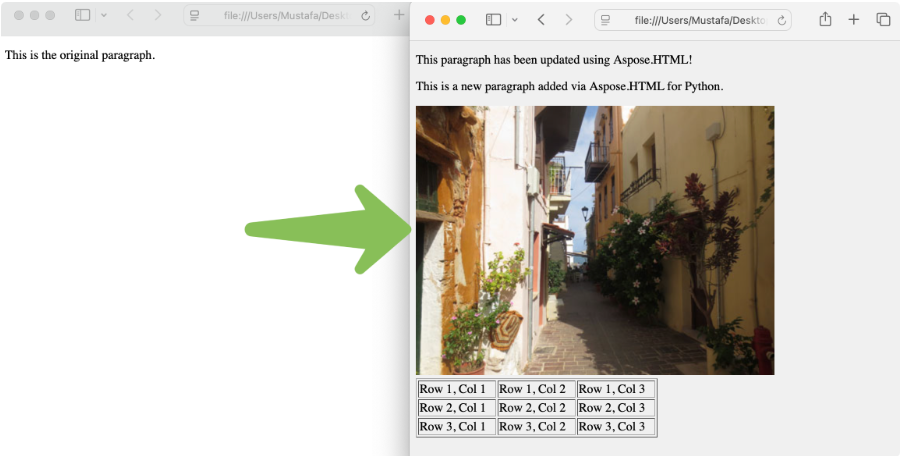
- 通过初始化HTMLDocument类的对象来加载现有的 HTML 文件。
- 通过 ID 访问段落并更新段落文本。
- 通过调用create_element函数创建新段落。
- 创建图像元素并设置属性。
- 创建一个简单的 HTML 表并添加行和单元格。
- 调用get_elements_by_tag_name方法来访问<head>标签并添加<meta>。
- 通过调用保存方法保存修改后的 HTML 。
您可以按照下面给出的代码片段进行操作:
import os
import aspose.html as html# Set up paths for working files.
output_dir = "files"
input_file = os.path.join(output_dir, "existing.html")
output_file = os.path.join(output_dir, "modified.html")# Apply Aspose License
license = html.License()
license.set_license("License.lic")
# Load the existing HTML file by initializing an object of the HTMLDocument class.
document = html.HTMLDocument(input_file)
# Change document title
document.title = "New Title"
# Access the paragraph by ID and update paragraph text.
paragraph = document.get_element_by_id("intro")
if paragraph:paragraph.text_content = "This paragraph has been updated using Aspose.HTML!"
# Create new paragraph by calling the create_element function.
new_paragraph = document.create_element("p")
new_paragraph.text_content = "This is a new paragraph added via Aspose.HTML for Python."
# Create an image element and set the attributes.
image = document.create_element("img")
image.set_attribute("src", "https://www.w3schools.com/html/img_chania.jpg")  # Working URL
image.set_attribute("alt", "Chania")
# Create a simple HTML table.
table = document.create_element("table")
table.set_attribute("border", "1")  # Visible table borders
table.set_attribute("width", "50%")
# Add rows and cells manually
for i in range(3):row = document.create_element("tr")for j in range(3):cell = document.create_element("td")cell.text_content = f"Row {i+1}, Col {j+1}"row.append_child(cell)table.append_child(row)# === Access <body> and add all new content ===
body_elements = document.get_elements_by_tag_name("body")
if body_elements.length > 0:body = body_elements[0]# Set background color using pure HTMLbody.set_attribute("bgcolor", "#f0f0f0")# Append new elementsbody.append_child(new_paragraph)body.append_child(image)body.append_child(table)# Invoke the get_elements_by_tag_name method to access <head> tag and add <meta>.
head_elements = document.get_elements_by_tag_name("head")
if head_elements.length > 0:head = head_elements[0]meta = document.create_element("meta")meta.set_attribute("name", "description")meta.set_attribute("content", "This is a sample HTML document with an image and table.")head.append_child(meta)# Save the modified HTML by calling the save method.
document.save(output_file)
printf("HTML modified and saved to: {output_file}")
输出:
总结
Aspose.HTML for Python via .NET使开发人员能够以编程方式自动化编辑 HTML 文件的工作流程。本指南演示了如何使用 Python 编辑 HTML。使用这款强大的 HTML SDK,您可以轻松完成编辑工作。
常见问题解答
问:如何使用 Python 编辑 HTML 文件?
答:Aspose.HTML for Python via .NET提供了以编程方式编辑 HTML 文件的功能。
问:如何用 Python 编写 HTML?
答:您可以通过 .NET 使用 Aspose.HTML for Python在 Python 中创建 HTML 文件。
问:Python 可以解析 HTML 吗?
答:是的,Python 可以通过 .NET 使用 Aspose.HTML for Python解析 HTML ,它提供了完整的 DOM API 来加载和浏览 HTML 文档。
加入Aspose技术交流QQ群(1041253375),与更多小伙伴一起探讨提升开发技能。