

通常在做VUE进行异步请求,都是使用常规的请求,然后在回调里面进行业务以及页面的渲染调整。
使用await能够简便很多,而且在循环里面使用await可以进行按顺序请求。
基础使用:在VUE组件里面,await 函数需要在 async 函数里面进行配合使用,常见于:created、mounted 或自定义方法:
export default {data() {return {userData: null,error: null};},async created() {try {// 等待异步操作完成this.userData = await fetchUserData(); // 假设 fetchUserData 返回 Promise} catch (err) {this.error = "获取数据失败";}}
};
处理多个异步请求:
async mounted() {try {const [data1, data2] = await Promise.all([fetchData1(),fetchData2()]);this.data1 = data1;this.data2 = data2;} catch (err) {// 统一错误处理
  }
}
集合for of 循环,可以实现按顺序执行:顺序执行:for...of 或 for 循环
async function fetchUsersSequentially(userIds) {const users = [];for (const id of userIds) {// 每次迭代等待前一个请求完成const user = await fetchUser(id);users.push(user);}return users;
}
forEach方法:不支持在回调中使用 await!因为 forEach 不会等待异步操作完成。
同样 for in 循环也不能。 for in 适用于枚举,for of适用于迭代对象:
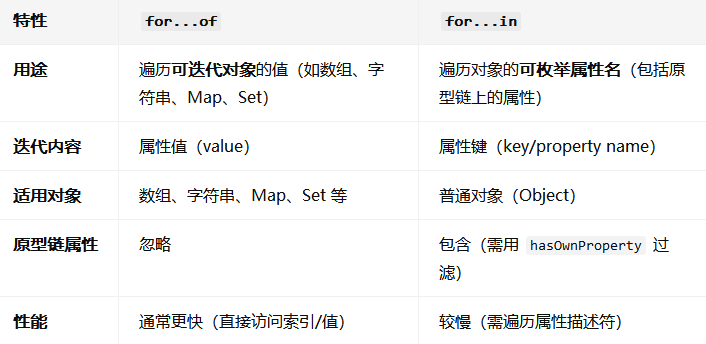
示例:
const arr = [10, 20, 30];// for...of 遍历值
for (const value of arr) {console.log(value); // 输出: 10, 20, 30
}// for...in 遍历索引(不推荐用于数组)
for (const index in arr) {console.log(index); // 输出: "0", "1", "2"(字符串类型)
}
遍历对象:
const obj = { a: 1, b: 2 };// for...of 不能直接用于普通对象(会报错)
// for (const value of obj) { ... } // TypeError: obj is not iterable// for...in 遍历对象的键
for (const key in obj) {console.log(key); // 输出: "a", "b"console.log(obj[key]); // 输出: 1, 2(需手动访问值)
}
打完收工!


信道估计的MATLAB实现)


